 EasyMD
 Write like a document. Keep it as Markdown.
Formatting appears the moment you type it. Saving is automatic. Export to Markdown, PDF, or Word.
Start writing →- Formats as you type
- Saves automatically
- MD / PDF / Word export
- Dark mode
- Stays on your device
EasyMD — a free Markdown editor that runs in your browser
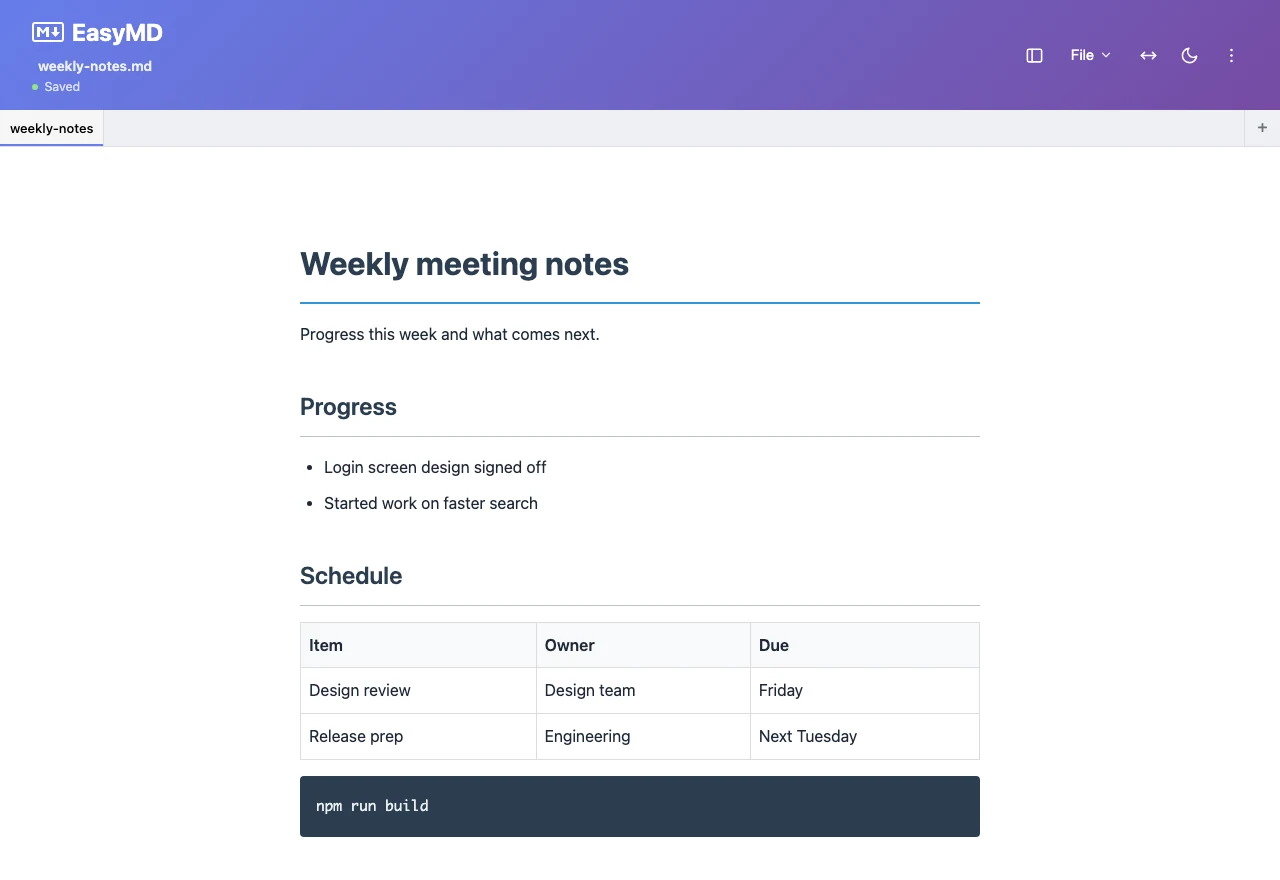
EasyMD is a free Markdown editor you can use straight from your browser, with nothing to install and no account to create. Type a Markdown symbol and the formatting appears right there, the way it does in a normal document editor, and what you write is saved as you go. When the document is done you can take it with you as Markdown (.md), PDF, or Word (.docx), which covers README files, meeting notes, blog drafts, and technical documentation alike. Your documents are not sent to a server; they stay in the browser you are using.
What is Markdown?
Markdown is a lightweight markup language created by John Gruber in 2004. Instead of HTML tags, it uses plain characters like #, *, - to express headings, lists, emphasis, tables, and code blocks. The raw text stays readable on its own but converts cleanly into a formatted document, which is why GitHub, Notion, Slack, Obsidian, Reddit, and countless other platforms adopted it as a default way to write.
What the editor looks like
How it works
- Formatting happens where you type
Type a hash (#) and a space at the start of a line for a heading, or a hyphen (-) for a list. You do not need to know the symbols, though. Press slash (/) on an empty line to pick from 10 blocks, including headings, lists, checklists, code blocks, quotes, tables, and dividers. Select text and a toolbar appears with bold, italic, text colour, and more.
- Saving happens in two layers
About 1.2 seconds after you stop typing, the document is saved to this browser's storage (localStorage). Separately, every 5 minutes, if the content has changed, a copy goes into the version history. Pressing Ctrl+S adds an entry too. Each document keeps up to 20 entries, and the oldest is dropped when a new one is added.
- Take it out as a file
Use the File menu to export Markdown (.md), PDF, or Word (.docx). For PDF, a print-ready view opens in a new window and you save it with your browser's print dialog. Word export carries over headings, lists, tables, code blocks, and quotes, but images are not converted into pictures. To show a document to someone else, send them one of these files.
What it does
- Formatting as you type — Markdown symbols turn into real formatting the moment you type them, with no split-screen preview to read.
- Automatic saving — Your document is stored in the browser as you write, so a refresh or a closed tab does not lose it.
- Export where you need it — Download Markdown (.md) and Word (DOCX) files, or make a PDF by choosing "Save as PDF" in the browser print dialog.
- Several documents, in tabs — Keep several documents open as tabs at the top and move between them. Closing a tab does not delete the document; it stays in the document list.
- Paste images — Paste a screenshot with Ctrl+V or drag an image file in and it goes straight into the document. Each file can be up to 5 MB, and anything wider than 1280px is scaled down. PNG stays PNG; other formats are saved as JPEG.
- Tables, checklists, code — Edit tables directly, track to-dos with checkboxes, and keep code in monospace code blocks.
- Dark mode — It starts out following your operating system's light or dark setting, and the theme button in the editor lets you pick light or dark yourself.
- Private by design — There is no account to create and no server storing your documents. They live in your browser.
Who it is for
- Developers writing README files and open-source documentation
- Anyone turning meeting notes, specs, or reports into something shareable
- Writers drafting posts for Medium, Dev.to, Ghost, or their own blog
- Students structuring lecture notes and assignments
What EasyMD does not do
EasyMD is built for one person writing a document and taking it away as a file. So it does not have the features below. Worth checking before you start.
- Real-time collaboration — Several people cannot edit the same document at once. To work together, export the file and pass it around.
- Accounts and sync between devices — There is no login, so there is no cloud copy. A document written on your home computer will not appear at work, and on the same computer it will not appear in a different browser.
- An offline app — In a tab that is already open, you can keep writing and saving when the connection drops. But there is no offline install, so with no connection you cannot open the site fresh or reload the page.
- Backups — Your documents exist only in this browser's storage. Clearing site data or cookies in your browser settings deletes them too, and there is no way to get them back.
If you use Safari, one more thing. Safari can delete the data a site has stored once 7 days of Safari use pass without you interacting with that site, and localStorage is included. Web apps added to the Home Screen are an exception. Export anything you want to keep as a Markdown file and store it somewhere else.
How this compares with Notion, Typora, and Obsidian is covered on the editor comparison page.
Common questions
- Will my documents still be there after I close the browser or restart my computer?
- Does it work offline?
- Can I see documents from my home computer at work?